
DNS basics and how DNS works in Neeto

January 6, 2026
This blog started with an explanation of how DNS works in Neeto. However we covered a lot of ground about how DNS actually works.
The Basics of DNS Records
A Domain Name System (DNS) is a hierarchical and decentralized naming system for computers and servers connected to the Internet. It essentially translates human-readable domain names into machine-readable IP addresses.
What is a Domain Name?
A Domain Name is a unique, human-friendly label used to identify one or more IP
addresses. It's what people type into a web browser to visit a website. For
example, google.com and wikipedia.org are domain names.
Purchasing a New Domain Name
You don't buy a domain name outright. Technicall,y you register the right to use it for a specified period (typically 1 to 10 years) from a Domain Name Registrar. These are called "registrars" because you are registering the right to use the domain name.
Popular Domain Name Registrars are GoDaddy, Namecheap, Cloudflare and Porkbun.
DNS Records: Types and Uses
DNS Records provide information about a domain, primarily mapping hostnames to IP addresses. There are many different types of DNS records. We would be looking at the important ones.
A Record
"A record" stands for "Address record". It maps a domain name (like google.com) to an IPv4 address (like 93.184.216.34).
AAAA Record
This does exactly the same thing as A record but for the IPv6 address. Four As signifies a bigger address range.
CNAME Record
"CNAME record" stands for "Canonical Name Record".
Instead of pointing directly to an IP address like an A record does, a CNAME points one hostname to another hostname.
An example of CNAME record could be: blog.bigbinary.com ->
bigbinary.github.io.
What CNAME is saying here is that if you are visiting blog.bigbinary.com, then
this record doesn't have the IP address information. If you want an IP address,
then ask for that info from bigbinary.github.io. Remember that IP addresses
are provided by A and AAAA records.
Another way of looking at it is that an A record provides “the IP address,” while CNAME provides the address of the next machine to which we can ask for the IP address.
Please note that it is quite possible that the next machine might have another CNAME and that in turn might have another CNAME.
The main point is that CNAME keeps the record of the next machine to ask for. In the end, some machine has to have an A or AAAA record so that a domain is mapped to an IP address.
MX Record
"MX Record" stands for "Mail Exchanger Record".
It specifies the mail servers responsible for accepting email messages on behalf of of a domain.
TXT Record
A TXT record (Text record) lets a domain owner store arbitrary text data in DNS. Other services then look up that text to verify ownership, check email policies, etc. Think of it like a sticky note that the domain owner can add for others to read.
Here are some use cases of the TXT record:
Adding SPF records
bigbinary.com. IN TXT "v=spf1 ip4:198.51.100.10 include:_spf.google.com -all"
Domain verification
Here is an example of site verification by Google Site.
bigbinary.com. IN TXT "google-site-verification=asduiashd9812h98asdh"
Adding DMARC records
_dmarc.bigbinary.com. IN TXT "v=DMARC1; p=reject; rua=mailto:[email protected]"
NS Record
NS stands for "Name servers".
Let's say that a user types in the URL https://blog.neeto.com. The job of the
DNS system is to ultimately find an IP address to which the request can be sent.
Now, let's think about how to go about searching for the IP address.
We need to ask some machine for more information about blog.neeto.com. That
information could be a CNAME record, an A record, or a AAAA record. But the
problem is who should be asked. From where we start the journey.
That's where the NS record comes into the picture. Remember, each domain is registered with a registrar. So that's where the DNS system starts the journey. First, DNS will ask the registrar of the domain, "Hey, can you give me the Name servers to whom I can start asking questions?"
Let's take a practical case and execute the following command on the terminal:
whois neeto.com
We'll get a lot of data, but we want to concentrate on the following six lines:
Domain Name: NEETO.COM
Registrar WHOIS Server: whois.cloudflare.com
Registrar: Cloudflare, Inc.
Registrar URL: https://www.cloudflare.com

Name Server: BARBARA.NS.CLOUDFLARE.COM
Name Server: YEW.NS.CLOUDFLARE.COM
We can see that the Registrar for neeto.com is "Cloudflare". We also see that
the Name servers are two servers, which are also clouflare.com. The people who
designed name servers dictated that there should always be at least two name
servers. In this way, if one of them goes down for any reason, the overall
system is still working.
Taking our example of blog.neeto.com, if we need a CNAME record, an A record,
or a AAAA record, then we need to start asking those questions to these two name
servers.
Now let's do the same experiment with another domain. This time, we will choose
https://bigbinary.com.
whois bigbinary.com
This time, we will get the following lines.
Domain Name: BIGBINARY.COM
Registrar: GoDaddy.com, LLC
Registrar WHOIS Server: whois.godaddy.com
Registrar URL: http://www.godaddy.com

Name Server: BARBARA.NS.CLOUDFLARE.COM
Name Server: YEW.NS.CLOUDFLARE.COM
Notice that this time the registrar is GoDaddy, but the Name servers are
cloudflare.com. This is because bigbinary.com is registered with GoDaddy.
When a domain is purchased from a registrar, the default values of the name
servers will point to the registrar's name servers. So after the initial
registration, bigbinary.com had the GoDaddy name servers, but has chosen not
to use them. With the help of NS records, BigBinary has told GoDaddy that
BigBinary doesn't want to use GoDaddy's name servers and wants GoDaddy to use
the Cloudflare name servers. This will mean that all the future DNS records for
bigbinary.com can be maintained in Cloudflare.
This goes on to show that one is not restricted to the name servers of the registrars.
Name servers, just like CNAME records, never point to an IP address. They always point to another host name.
Different parts of a URL
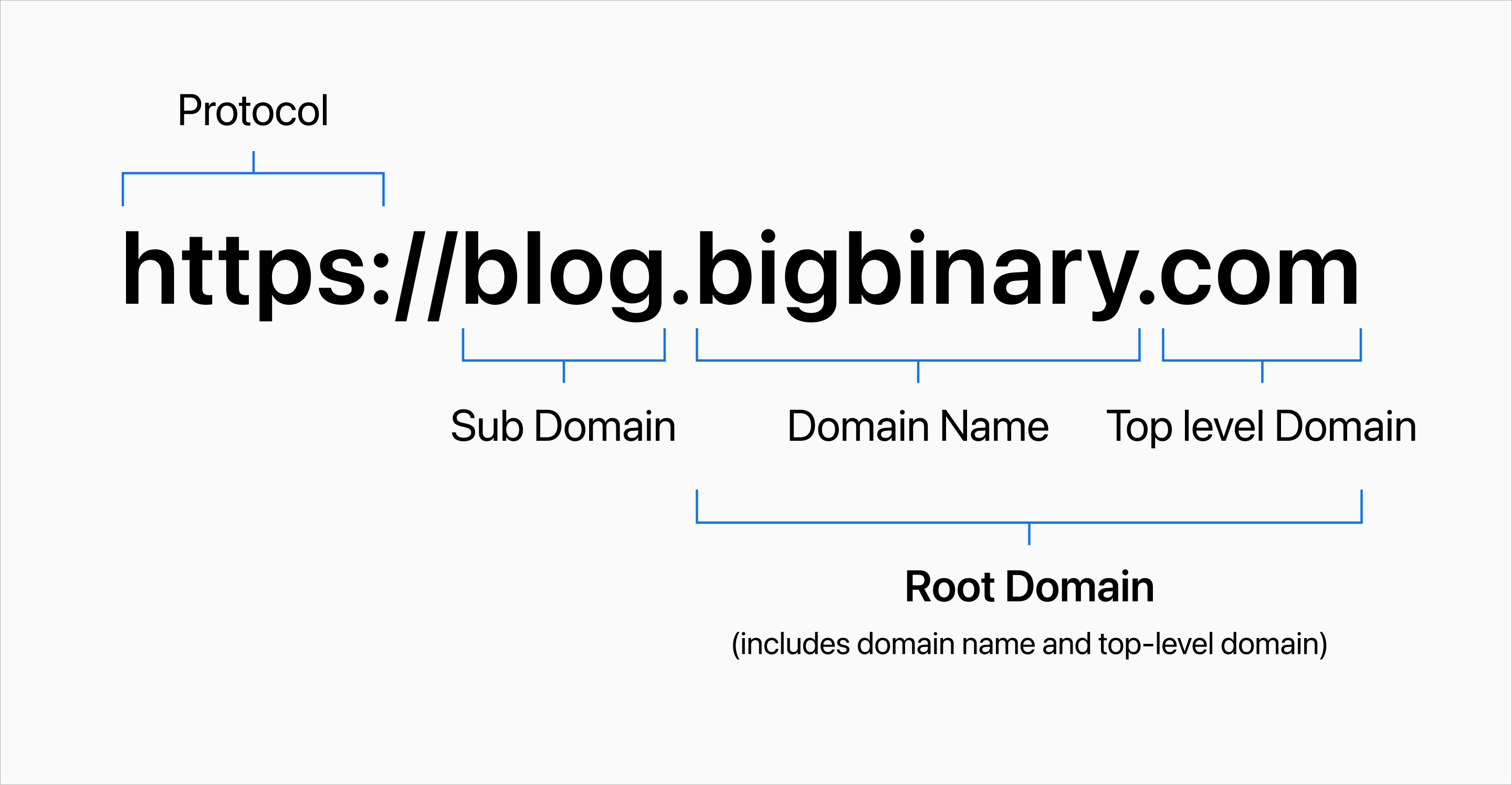
Protocol
The protocol is the initial part that specifies the set of methods used for
transferring data between a web browser and a server. The server essentially
tells the browser how to communicate. The most common protocols are http
(Hypertext Transfer Protocol) and its secure version https (Hypertext Transfer
Protocol Secure).
Top-Level Domain (TLD)
A Top-Level Domain (TLD) is the very last part of a domain name, located after the final dot.
For example, in google.com the .com is the Top-Level Domain (TLD). Common TLDs
are .com, .org, .net etc.
Subdomain
A subdomain is a label that comes before the main part of a domain name.
For example, in the address blog.bigbinary.com the blog is the subdomain.
We can have a.b.c.d.e.f.blog.bigbinary.com. Technically upto 127 levels of
subdomain is allowed.
Root domain
A root-level domain is the base name of a website. For example, in
www.google.com the .com part is the TLD and google.com part is the root
level domain.
Strange case of www subdomain
Let's say that we registered a brand new domain called spinjudo.com with
Cloudflare. We have our marketing site up and running on Vercel, and we want to
host our blog on WordPress. So we will add these two DNS records.
For our marketing site, we will add a CNAME record something like this:
spinjudo.com IN CNAME 76.76.21.21
And then for the blog, we will add another CNAME record something like this:
blog IN CNAME domains.wordpress.com.
So now both https://spinjudo.com and https://blog.spinjudo.com are working.
But what about https://www.spinjudo.com.
Developers often forget that users can type https://spinjudo.com or they can
also type https://www.spinjudo.com.
Time to time in your life, you might have come across cases where a site is
working only with www or only without www. That's because the developers
either took care of www and forgot to take care of the root domain or the
developer took care only of the root domain and not of www.
Technically, www is a subdomain and that needs to be taken care of too. In
this case for spinjudo.com we need to add one more CNAME record for www and
that might look like this:
www IN CNAME 76.76.21.21
Rules regarding CNAME records
The first rule is that CNAME records can only be added to subdomains. It means CNAMES can't be added to root domains. That's the rule.
However, some DNS providers allow a technique to bypass this rule. They provide a different type of record called "ANAME" record which allows CNAME for root domains.
In general, we advise against using ANAME records.
The second rule is that if a subdomain has a CNAME record, then that subdomain can't have any more records.
Why do we need to wait for some time after updating the domain
If you change anything related to DNS you are asked to wait 24 to 48 hours for the change to propoage. What does that mean?
If you type www.neeto.com into your browser, it uses its DNS cache. The browser might not even ask anyone what the ip address of www.neeto.com is. This is because maybe 20 seconds ago you visited www.neeto.com and now you refreshed the page.
If the browser really needs an updated DNS value, then the browser will send that request to your laptop. Your laptop has a DNS cache. Your laptop might not ask anyone for the updated DNS value for a while.
Now, if the laptop needs to know the DNS valu,e then the laptop will ask for an ansewr to the root servers.
There are only 13 root servers in the world. These root servers are named from "A" to "M". However just because there are 13 root servers it doesn't mean that there are only 13 servers. Each of those 13 root servers are running behind lots of physical servers.
The complete list of physical servers can be found at https://root-servers.org.
Root servers do not know the answer to every question. However, they do know the
address of the servers that can answer your questions. For example, if your TLD
is .com, then the root server will send you to a different server. If your TLD
is .net then you will asked to go to a different machine. Similarly, there are
servers to serve TLDs like .co.uk, .in etc.
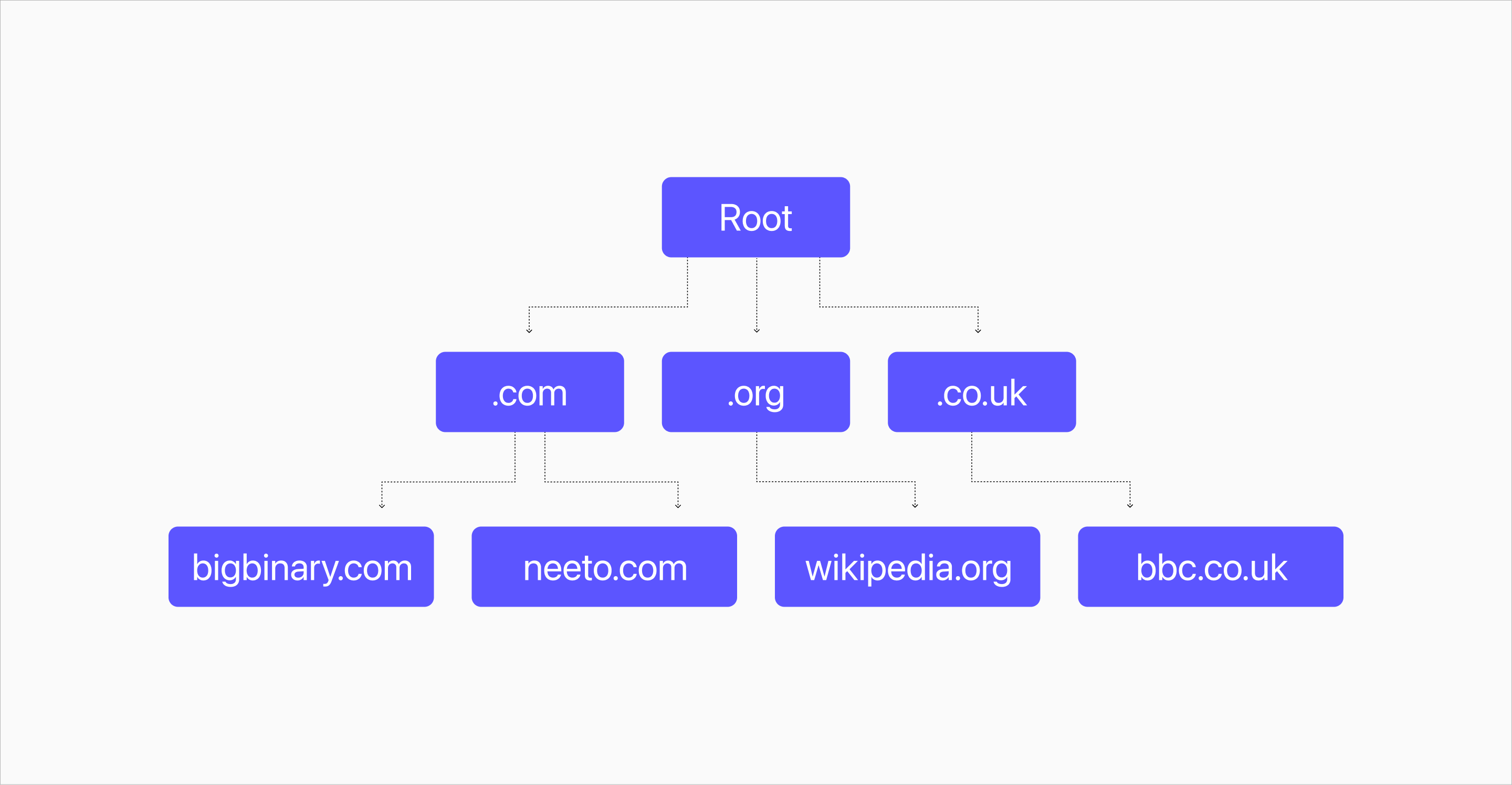
Note that at each layer, there is some amount of DNS caching. To ensure that the updated value is completely updated throughout the Internet of the whole world we need to give some time for the old cached value to be removed.
The way these servers work also shows the decentralized nature of DNS. There is no one single place where all the DNS values of the world is stored. DNS values are stored at different places, but there is a path to get to those values all the way from the root servers.
neeto-custom-domains-frontend package
Adding a custom domain could be intimidating. People are asked to change DNS records, which they might not have touched for years. A small misconfiguration has the potential to bring the whole website down. To ensure that the user experience of adding a "custom domain" is great, we at Neeto decided to go the extra mile.
We bought one domain each at the following name registrars:
- Cloudflare
- Namecheap
- Hostinger
- Digital Ocean
- Wix
- Porkbun
- Squarespace
- AWS route 53
- Network solutions
- Godaddy
- Strato
- Microsoft 365
We checked out how they ask their users to make DNS entries and we captured the screenshots. Now, depending on what "name server" the user is dealing with we display a help message and help screens customized for that user.
For example, if a user is using Cloudflare as their name server then the help screen might look like this.
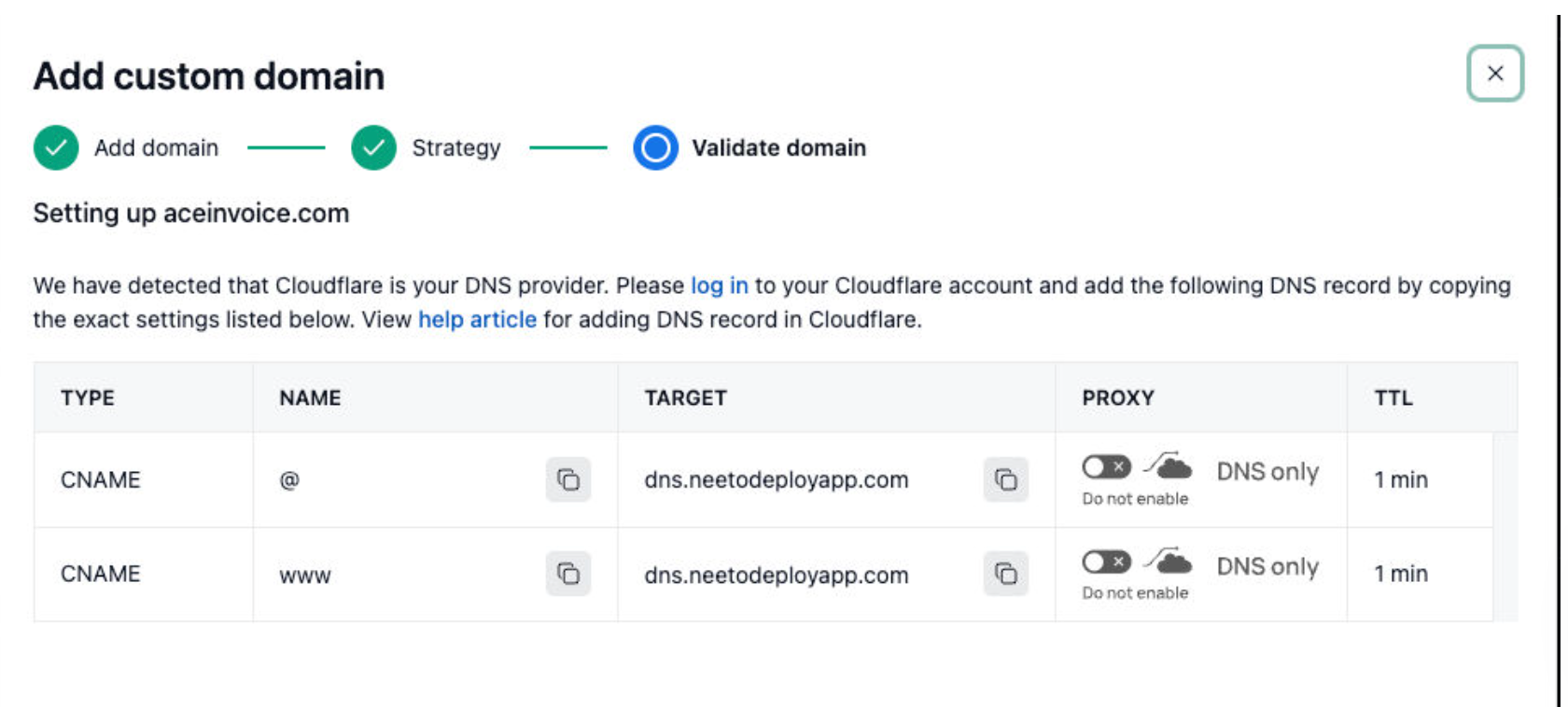
Notice that the above image has a column called "Proxy" which is cloudflare specific.
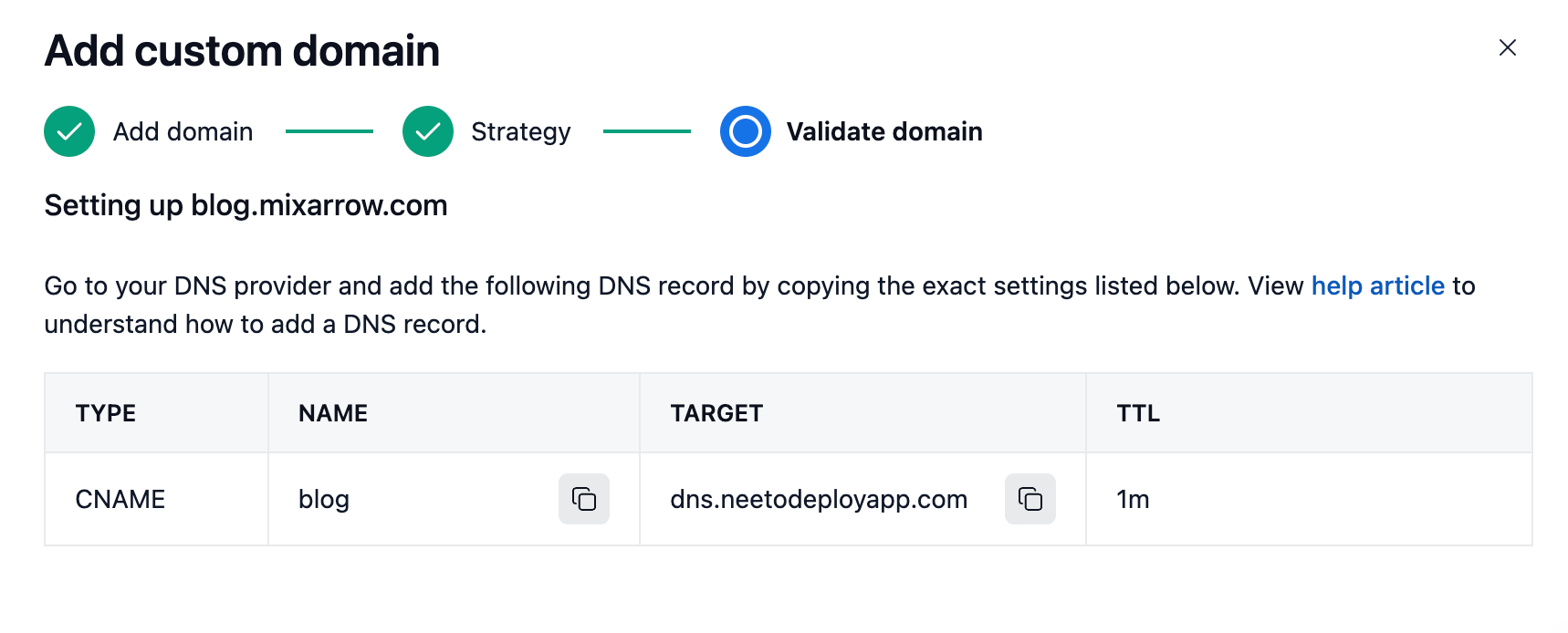
If the domain registrar is GoDaddy then the help screen might look like this.
At Neeto we build a number of products and almost all the
products need the feature of "custom domain". To share the code related to
domain handling in a consistent manner, we have built a utility tool named
neeto-custom-domains-engine.
When a user adds a domain to the Neeto product, this tool finds the name server of that domain. Then we check if we have the custom help screen and help instructions for that name server or not. If we don't, then we provide generic help instructions.
Validating DNS records
Now that the user has added the custom domain, Neeto needs to verify that those DNS records are indeed added.
If a user tries to add the domain www.spinjudo.com, then Neeto will ask the
user to add following CNAME for www.
| Name | value |
|---|---|
| www | dns.neetodeployapp.com |
Now, let's assume that the user has added that record. Now we need to verify this record. Let's execute the following command from the terminal.
nslookup -type=CNAME www.spinjudo.com
We should see a response similar to this:
Non-authoritative answer:
www.spinjudo.com	canonical name = dns.neetodeployapp.com.
Here We can see that the DNS record has propagated properly for this domain and it's receiving the expected value. Now, let's see how this would look for a record without the proper records added.
nslookup -type=CNAME www.spinjudo2.com
This is the response we will get for spinjudo2.
Non-authoritative answer:
*** Can't find www.spinjudo2.com: No answer
This could mean two things.
- Either the user has not added the records properly.
- The records have been added, but they have not propagated properly. Sometimes it can take upto 48 hours for the added records to be seen.
In this case we saw the example of validating CNAME records. However same process is followed when it comes to validating A records or AAAA records.
Traefik to route the custom domain
Typically, when it comes to deploying an application one can deploy the application using services like Heroku, Render, Railways or directly on cloud services like EC2, GCP, Azure etc. At Neeto, we decided to build NeetoDeploy. It's a service similar to Heroku for our internal use.
NeetoDeploy uses Traefik, which is a leading modern open source reverse proxy. In simple terms, Traefik is a load balancer. All requests come to the load balancer and then the requests are routed to the right place.
Earlier, we talked about setting up a custom domain. I have setup custom domain
for https://calendar.spinjudo.com. As part of setting up a custom domain, I
added a CNAME for dns.neetodeployapp.com.
After adding the CNAM,E Neeto validated the record. Once Neeto determines that the user has correctly added the CNAME then Neeto adds these custom domains to Traefik. In reality, four records are added as shown in the picture.
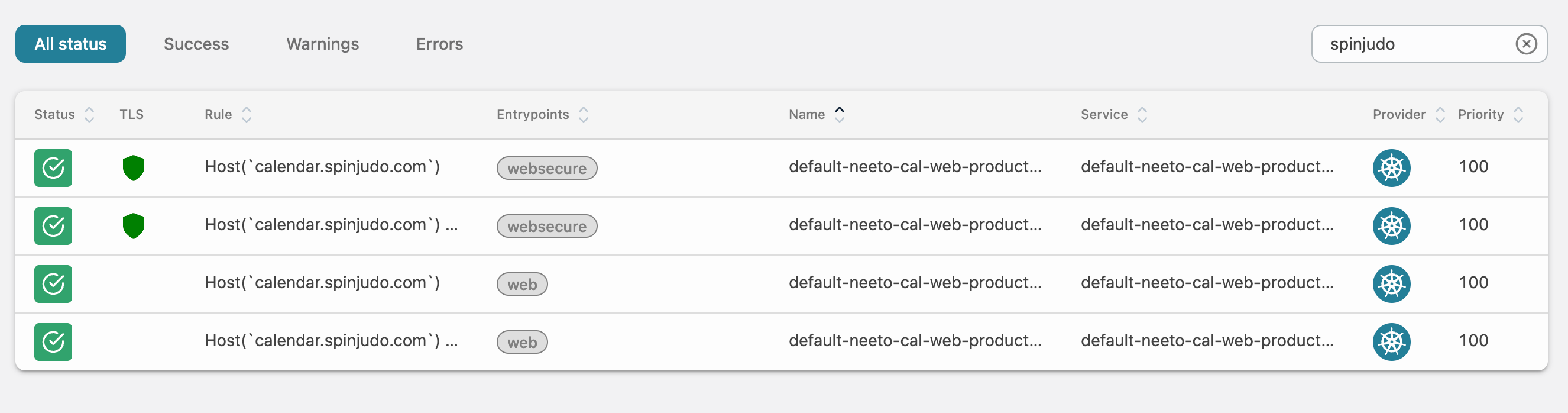
In total, we see four records. The first records are "websecure". It means they
have https turned on. The last two are just web. It means they support
http.
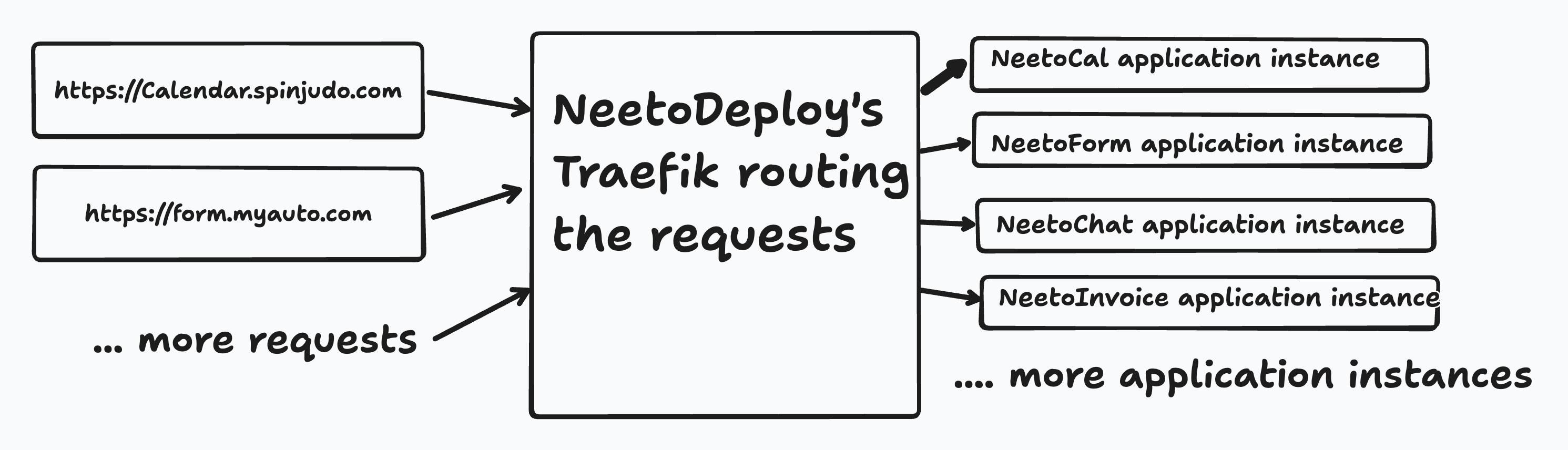
Once a request for a domain for calendar.spinjudo.com comes, then those
requests will be sent to NeetoDeploy's Traefik. Traefik will map that
calendar.spinjudo.com to an instance of the NeetoCal application and the
request will be forwarded to that server.
Please note that Traefik doesn't fulfill the request. Traefik acts as a load balancer and sends the request to the right server.
Finding the ip address
When a user types https://calendar.spinjudo.com, then the browser needs to know the ip address to which to hit. In other words, we ultimately need to know the A record.
We can use the tool dig to find the final A record value when a user visits
https://calendar.spinjudo.com. First, let's see the tool in action.
dig +noall +answer calendar.spinjudo.com A
The response we get is following:
calendar.spinjudo.com. 60 IN	CNAME	dns.neetodeployapp.com.

dns.neetodeployapp.com.	60	IN	CNAME	a7b4fc193275e43ea9ba2b7753b080dc-6ad6aaca90bd0ea4.elb.us-east-1.amazonaws.com.

a7b4fc193275e43ea9ba2b7753b080dc-6ad6aaca90bd0ea4.elb.us-east-1.amazonaws.com. 60 IN A 34.233.85.113
The first line is a CNAME to dns.neetodeployapp.com.
The second line is a CNAME to an EC2 instance on AWS.
The third line is an A record, which gives us the ip address of the machine.
In the above command, we used +noall and +answer. The +noall is really
useful. It means "just hide all the output". By default, dig output spits a
lot of information. By using +noall we tell dig to go on quite mode.
And then we tell dig to show data for the "answer" section by using +answer.
Similarly, using dig +noall +authority will show only the data about the
"authority" section.
Issuing SSL certificate
We know that a user can visit http://spinjudo.com or the user can also visit https://spinjudo.com. To serve HTTPS, we need SSL certificates.
We can use the user to purchase SSL certificate, configure it and apply it but that would be too cumbersome for our users.
To generate SSL certificate we will use Let's Encrypt which issues free trusted SSL certificates.
SSL certificates are issued using the Automatic Certificate Management Environment (ACME) protocol by Let's Encrypt. This is a simple protocol by which the service can verify the authenticity and ownership of the requested website.
The process of domain validation, issuinga certificate and then renewing certificate could be a bit daunting. To make life easier, Let's Encrypt has provided certbot. This tool makes it easier to get SSL certificate from Let's Encrypt.
It's worth noting that the certificate issued by Let's Encrypt is valid only for 3 months. Before the certificate expires, we need to ask Let's Encrypt to issue a new certificate and that certificate will be valid for another 90 days.
NeetoCal using Cloudflare
NeetoCal and other Neeto products use Cloudflare as their name servers.
If we look at the NeetoCal DNS record, then this is what we see.

Adding a * in place of the name of the record is known as a wildcard
character. This serves as a catch-all for any undefined subdomain, meaning all
the subdomains that do not have an explicit DNS record associated with it will
be matched by this record. As we can see in the picture above, the * value is
proxied. What it means is that any attempt to connect to the NeetoCal IP address
first hits the Cloudflare server. Cloudflare server runs a bunch of checks on
the incoming requests, and then passes that request to the intended IP address.
For example, if I'm getting a lot of spammy requests from Spain, then I can
configure Cloudflare to prevent requests coming from Spain. Or I can rate limit
requests for /login url and things like that.
If we do not use proxy, then that means the user is directly connecting to the Neeto server and Cloudflare is not in the picture. In this case, if a DDoS attack happens, then Cloudflare will not be able to protect us.
Follow @bigbinary on X. Check out our full blog archive.